Exploring The World From Home

Screen Shot 2020 03 25 at 2 20 25 PM

With many schools closed due to the pandemic, many K12 educators are working hard to understand the basics of running an online classroom. Everyone is trying to help each other, with social media and discussion threads filled with stories, advice, and lists of resources. Lots and lots of lists.

A good chunk of the advice is, of course, centered around using Google tools, like Classroom,1 with the primary focus seemingly on how to continue teacher-directed instruction in an online environment. I wish there was more effort to turn that around and find ways for students to create projects based, at least in part, on their interests and concerns, rather than continuing the fixed curriculum.

Continue reading

2019 Dumb Terminal

Recently I’ve noticed that Google has been doing a lot of advertising for Chromebook. The devices themselves are made by several different companies, of course, but all of them run the Chrome operating system created and controlled by Google.

The ads make several implicit comparisons with “regular” laptops – faster startup, longer battery life, no viruses – even though Chromebook are not really computers. In fact, they have more in common with 70’s era devices known as dumb terminals.

A long, long time ago, in my first undergraduate programming class, we never got to touch the computer itself. Instead, we had to punch our program into cards, one line per card. The cards were stacked up and delivered to a window in the computer center where someone would feed them into a reader for the machine to process. Two to twelve hours later, we could pick up a printout of the results.

A few semesters later, I took a graduate-level programming class that offered special privileges. I was able to interact directly with the computer through a CRT terminal similar to the one above. It was known as a “dumb” terminal since the device had no computing power of it’s own and simply acted as an input device for the huge machine in a nearby room. But at least I didn’t have to carry around a big box of cards.

Although Chromebooks do have some processing power, their primary function is to act as a window into the web, especially Google’s online applications. Almost all the work is being done by machines located in data centers around the world. The results of all your work are also stored out there in the cloud.

We can debate the relative value of Chromebooks and whether they are good devices to be using in schools (or using at all).

But please don’t tell me that kids with those devices are using computers. And that they have exactly the same capabilities as any other laptop.

When using a Chromebook, you are sitting in front of the modern equivalent of the dumb terminal I used fifty years ago.


The picture is of a dumb terminal very similar to the ones that lined one wall in the computer center at my college. They came in a variety of forms.

Certified Value

Delmar Coulter Seventh Grade Certificate 1928

Last month I stumbled across an interesting discussion thread in the ISTE forums, one that began with someone asking for a list of “websites that offer their own teacher certification”.1

After less than a week, participants had suggested more than two dozen edtech certification programs and offered some insight into the requirements for a few. Someone also posted the link to a website dedicated to listing all the edtech certifications available, the existence of which surprised me but probably shouldn’t have. Between the discussion and that site, I’m estimating that there must be something like 200 of these certifications, counting multiples from some companies.

However, missing from this discussion was anyone questioning why. Why should a teacher spend their time, effort, and possibly money to obtain one of these certifications? What is the value of being certified on a particular platform or resource?

I know many educators who have earned one or more. In fact, many of the educators who are presenting at the ISTE conference this week include multiple certifications in their bios2. But beyond simply adding a line to their CV, a large number of them are actually directly representing the company.

Which makes me wonder if the primary beneficiaries of these certification program might not be the companies themselves. After all, they are getting lots of free marketing from the educators who promote their products at conferences and on social media. Does the company gain more from these promotions than the teacher’s students?

Speaking of students, do they benefit when their teacher gets a certification in using a particular edtech product? Does the software or resources their teacher has selected really help their learning in some way? Does being “certified” in one specific product discourage the teacher from exploring possible better options?

Ok, I’m not trying to demean anyone who earns one (or more) of the many, many edtech certifications with this rant. These are only questions, and I probably have a few more. I only hope my colleagues are considering these issues before they use any edtech product in their instruction, much less work on being certified in that product.

One last thought: what happens if/when the product you’ve committed your time and energy to disappears? Once upon a time I earned the right from Adobe to call myself a GoLive Certified Trainer. What’s GoLive you ask? Exactly. :-)


The image, a different kind of certificate than I’ve been ranting about, was posted by Douglas Coulter on Flickr and is used under a Creative Commons license.

1. If you’re an ISTE member, you can check out the posts here. Not sure if you also have to be a member of the EdTech Coaches group.

2. One person I follow on Twitter lists ten of them in their profile.

Free Comes With a Cost

IMG_2161

This article, with the provocative title Google’s got our kids, is about a year old, but the message is still one that every educator needs to understand. Especially if you’ve turned your classroom over to Google’s Classroom.

The author, a teacher who uses Google products with her students, makes the point that, although GSuite for Education and their other free or super-cheap products can be beneficial to schools and teachers, we also need to remember that the company has motives that are different from “normal” education vendors.

Unlike textbook publishers, Google has a “very strong interest not only in training the workforce of the future in G Suite, but also in forming positive and powerful brand associations in the minds of its littlest consumers”. Most of those kids sitting in front of a Chromebook running Google’s browser are too young to understand brand marketing.

Google’s “Be Internet Awesome” curriculum is another great example of the company selling itself to kids, specifically delivering the “message that Google is a trustworthy arbiter of online safety and privacy”.

The irony of a curriculum that teaches kids how to safeguard their privacy online yet is produced by a company known for its less-than-transparent use of personal data is a little on the nose, but the explicit lessons in Be Internet Awesome are too basic to be objectionable.

Pragmatic as the content is, it also transmits implicit lessons about the Google brand, whose brand colors, icons, and font are slathered over everything from student handouts to classroom posters to, for some reason, paper doll patterns for making your very own Internaut.

I doubt the students, or most of their teachers, get the irony.

In the end, the author admits that Google provides some useful tools, and that even the Be Internet Awesome curriculum “speaks to a real need schools have to prepare students for life in a digital world”.

However, we must understand that that these “free” resources still come with a cost.

The issue isn’t that Google has nothing of value to offer schools — clearly, it has — but rather at what price are we buying it. If it’s too steep we might want to recall lessons from our own educations, not about how to be savvy, polished consumers of technology, but about how to be citizens.


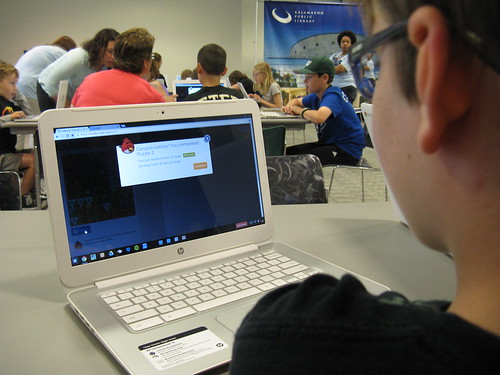
The image is from the Kalamazoo Public Library Flickr account, and is used under a Creative Commons License. Look closely at the screen. The student is viewing a message from a coding activity that incorporates characters from the game Angry Birds. Another example of brand marketing in a “free” educational product.

More About Alexa and Its AI Siblings

Following up on my previous rant about Alexa in the classroom, two good, related articles from Wired on the subject of artificial intelligence that are worth your time to read.

In one the writer highlights sections of reports to regulators from both Alphabet (Google’s parent) and Microsoft that warn of possible “risk factors” in future products.

From Alphabet:

New products and services, including those that incorporate or utilize artificial intelligence and machine learning, can raise new or exacerbate existing ethical, technological, legal, and other challenges, which may negatively affect our brands and demand for our products and services and adversely affect our revenues and operating results.

Microsoft was more specific:

AI algorithms may be flawed. Datasets may be insufficient or contain biased information. Inappropriate or controversial data practices by Microsoft or others could impair the acceptance of AI solutions. These deficiencies could undermine the decisions, predictions, or analysis AI applications produce, subjecting us to competitive harm, legal liability, and brand or reputational harm.

On the other hand, Amazon, in a report to stockholders, is more worried about governments regulating their products than they are about Alexa activating Skynet at sometime in the future.

The other post is a long excerpt from a book being published this month called “Talk to Me: How Voice Computing Will Transform the Way We Live, Work, and Think”.

It covers some pieces of recent history in the development of artificially intelligent products and the difficulty of programming a machine to understand the many ways that humans communicate.

I’m undecided about reading the whole book, but this part of it is worth 15 minutes.


The image is the user interface of HAL, the malfunctioning artificial intelligence from the 1968 film “2001: A Space Odyssey”. It also links to an interesting New York Times story of how the sound of HAL was created.